---
title: "Guided installation: Get started faster with the EPLAN platform"
description: EPLAN Guided Installation shows new customers how to get started with EPLAN Platform 2022, right from the initial download with free online tutorials.
image: https://blog.eplan.co.uk/hubfs/Guided_Installation_1090x620px_72dpi.jpg
---
[](https://blog.eplan.co.uk?language=all)
[ trends](https://blog.eplan.co.uk/tag/trends?language=all) [ projects](https://blog.eplan.co.uk/tag/projects?language=all) [ software](https://blog.eplan.co.uk/tag/software?language=all)

[Home](https://blog.eplan.co.uk) [Software](https://blog.eplan.co.uk/tag/software) Guided installation: Get started faster with the EPLAN platform
## Author
 Nigel Grant Nigel has been working at EPLAN UK for almost 3 years as an Applications Engineer. His main tasks include installing the EPLAN software, giving live demos to prospects and customers and training customers on best practices for using the software. He has previously worked as an Electrical Engineer and a Project Engineer, both of which have driven his passion for helping companies become more efficient and driving their engineering to the next level. Nigel's experience in panel wiring, electrical engineering and project work has given him a well-rounded view of the industry. This enables him to offer customers the best solutions for their processes. [grant.n@eplan.co.uk](mailto:grant.n@eplan.co.uk)
14/06/22
# Guided installation: Get started faster with the EPLAN platform
Author: Nigel Grant Time to read: minute minutes
EPLAN Guided Installation shows new customers how to get started with the current EPLAN Platform 2022, right from the initial download with free online tutorials.
The [EPLAN Platform 2022](https://www.eplan.co.uk/solutions/eplan-solutions/eplan-platform-2022/) is EPLAN's current engineering platform and the beginning of a brand new software generation. This update supports far more than the classic ECAD functionalities as it provides users with a multi-tool for their daily work. This means you will always have the right tool at hand, from preliminary planning to the construction of switchgear or cable harnesses.
But before a productive start, the software must first be properly installed on the user's premises. It's recommended that you have an administrator in the company who takes care of setting up EPLAN in the individual company environment. To make the installation and configuration of the software as easy as possible, we have introduced an installation guide.
### Guided Installation: Install EPLAN Platform, configure standards and the first steps to design
The [Guided Installation](https://www.eplan.com/en/main-guided-installation/guided-installation-platform-2022.html) explains all the important steps to install the current EPLAN platform on individual company systems. The help is available for single-user and network licenses and is specified again within this structure for initial and update installations. Users can select the type of installation they require and are then guided through a more detailed selection of topics. The detailed steps are based on recommendations from a team of EPLAN Professional Services Consultants to ensure every installation runs smoothly. If questions should still arise during the installation phase, [EPLAN Consulting](https://www.eplan.co.uk/services/consulting/) offers support.
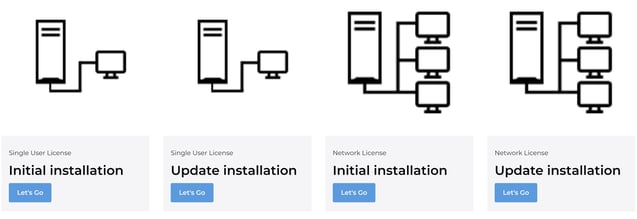*Guided Installation is part of the EPLAN Engineering Standard. It supports the correct installation and configuration of the EPLAN Platform 2022.*
### Install EPLAN single-user license
As an example, the following content is available for the [initial installation of a single -user license](https://www.eplan.com/en/main-guided-installation/guided-installation-platform-2022/single-user-license-initial-installation.html): hardware and software requirements, video-supported assistance with the installation, first steps with the software, as well as other important information.
| Installation - [Download software](https://www.eplan.com/en/main-guided-installation/guided-installation-platform-2022/single-user-license-initial-installation/installation/download-software.html) - [Install software](https://www.eplan.com/en/main-guided-installation/guided-installation-platform-2022/single-user-license-initial-installation/installation/install-software.html) | Launch - [Activate single-seat license online](https://www.eplan.com/en/main-guided-installation/guided-installation-platform-2022/single-user-license-initial-installation/first-start-platform-configuration/single-user-license-online-activation.html) - [Start EPLAN platform](https://www.eplan.com/en/main-guided-installation/guided-installation-platform-2022/single-user-license-initial-installation/first-start-platform-configuration/start-platform.html) - [Enter user data](https://www.eplan.com/en/main-guided-installation/guided-installation-platform-2022/single-user-license-initial-installation/first-start-platform-configuration/user-data.html) - [Create article database](https://www.eplan.com/en/main-guided-installation/guided-installation-platform-2022/single-user-license-initial-installation/first-start-platform-configuration/setup-parts-database.html) - [Create dictionary](https://www.eplan.com/en/main-guided-installation/guided-installation-platform-2022/single-user-license-initial-installation/first-start-platform-configuration/setup-dictionary.html) - [Project management database](https://www.eplan.com/en/main-guided-installation/guided-installation-platform-2022/single-user-license-initial-installation/first-start-platform-configuration/setup-project-management-database.html) - [Distribute settings to clients](https://www.eplan.com/en/main-guided-installation/guided-installation-platform-2022/single-user-license-initial-installation/first-start-platform-configuration/distribute-settings.html) |
| --- | --- |
| First Steps - [Open EPLAN sample project](https://www.eplan.com/en/main-guided-installation/guided-installation-platform-2022/single-user-license-initial-installation/first-steps/open-sample-project.html) - [Create your own workspace](https://www.eplan.com/en/main-guided-installation/guided-installation-platform-2022/single-user-license-initial-installation/first-steps/own-workspace.html) - [Use EPLAN Data Portal](https://www.eplan.com/en/main-guided-installation/guided-installation-platform-2022/single-user-license-initial-installation/first-steps/use-edp.html) - [Light or dark theme](https://www.eplan.com/de/main-guided-installation/guided-installation-platform-2022/single-user-license-initial-installation/first-steps/settings-dark-light-mode.html) - [Use online help](https://www.eplan.com/en/main-guided-installation/guided-installation-platform-2022/single-user-license-initial-installation/first-steps/use-online-help.html) - [Request help from support](https://www.eplan.com/en/main-guided-installation/guided-installation-platform-2022/single-user-license-initial-installation/first-steps/help-support-request.html) | Additional Information - [Activate license offline](https://www.eplan.com/en/main-guided-installation/guided-installation-platform-2022/single-user-license-initial-installation/additional-information/license-offline-activation.html) - [Update Download Manager](https://www.eplan.com/en/main-guided-installation/guided-installation-platform-2022/single-user-license-initial-installation/additional-information/updates-download-manager.html) - [Activate license for new hardware](https://www.eplan.com/en/main-guided-installation/guided-installation-platform-2022/single-user-license-initial-installation/additional-information/activate-license-on-new-hardware.html) - [SQL databases](https://www.eplan.com/en/main-guided-installation/guided-installation-platform-2022/single-user-license-initial-installation/additional-information/create-sql-parts-database.html) - [Uninstall software](https://www.eplan.com/en/main-guided-installation/guided-installation-platform-2022/single-user-license-initial-installation/additional-information/uninstall-software.html) |
You need to enable functional cookies to show this video.
*In short "how-to videos" the Guided Installation guides (new) EPLAN users through the installation and configuration of the current EPLAN Platform 2022. Here: Installation of a single-user license.*
### Install EPLAN correctly and benefit consistently
The [standardised installation](https://www.eplan.com/en/main-guided-installation/guided-installation-platform-2022/single-user-license-initial-installation/installation/install-software.html) not only saves valuable time when getting started with the software, but is also advantageous for later use. Therefore we strongly recommend that users who are taking their first steps with EPLAN to take some time and read the short instructions and watch the videos of the Guided Installation.
In addition, EPLAN provides other assets for Platform 2022 which assists with the standardisation and optimisation of the software. The [EPLAN Engineering Standard](https://www.eplan.com/en/main-eplan-engineering-standard.html) helps provide a solid foundation for faster implementation and consistent added value with specific examples and templates.
All topics of the EPLAN Guided Installation can be found here:
[](https://cta-redirect.hubspot.com/cta/redirect/3056111/36e34d5a-8c47-4539-bf66-464807806b64)
You might also be interested in these articles:
[Digital collaboration: industry practice for consistent data](https://blog.eplan.co.uk/digital-collaboration)
[Quick help with resource bottlenecks: The EPLAN Marketplace is here!](https://blog.eplan.co.uk/eplan-marketplace)
[Software for cable planning in 3D: EPLAN Harness proD 2022](https://blog.eplan.co.uk/software-for-cable-planning)
Related tags:
- [Platform Setup](https://blog.eplan.co.uk/tag/platform-setup?language=all)
- [SOFTWARE](https://blog.eplan.co.uk/tag/software?language=all)
- [Tips & Tricks](https://blog.eplan.co.uk/tag/tips-tricks?language=all)
- [Eplan Platform](https://blog.eplan.co.uk/tag/eplan-platform?language=all)
Share this article ...
## Comments
## Author
 Nigel Grant Nigel has been working at EPLAN UK for almost 3 years as an Applications Engineer. His main tasks include installing the EPLAN software, giving live demos to prospects and customers and training customers on best practices for using the software. He has previously worked as an Electrical Engineer and a Project Engineer, both of which have driven his passion for helping companies become more efficient and driving their engineering to the next level. Nigel's experience in panel wiring, electrical engineering and project work has given him a well-rounded view of the industry. This enables him to offer customers the best solutions for their processes. [grant.n@eplan.co.uk](mailto:grant.n@eplan.co.uk)
## Top 3 articles
[Answering your questions: How much does EPLAN cost?](https://blog.eplan.co.uk/how-much-does-eplan-cost?language=all) [What is Eplan & How much does it cost?](https://blog.eplan.co.uk/how-much-does-eplan-cost-0?language=all) [How do I migrate from EPLAN 5 to EPLAN Electric P8?](https://blog.eplan.co.uk/how-do-i-migrate-from-eplan-5-to-eplan-electric-p8?language=all)
## Recent articles
[ What does a migration to Eplan involve?](https://blog.eplan.co.uk/eplan-ecad-what-does-migration-involve?language=all) [ How Long Does It Take to Migrate to Eplan?](https://blog.eplan.co.uk/eplan-ecad-how-long-does-it-take-to-migrate?language=all) [ Parallel Engineering for Wiring Harnesses: BOMAG’s Digital Twin Strategy](https://blog.eplan.co.uk/bomag-revolutionizes-cable-harness-creation-with-eplan?language=all)
## Blog Newsletter

Subscribe to our blog and stay up to date!
## Videos
You need to enable functional cookies to show this video.
You need to enable functional cookies to show this video.
You need to enable functional cookies to show this video.
© EPLAN c/o RITTAL Ltd.
- Cookie Settings
- [Privacy policy](https://www.eplan.co.uk/uk/company/about-us/legal-information/privacy-policy/)
- [Legal Notice](https://www.eplan.co.uk/uk/company/about-us/legal-information/legal-notice/)